SUPPLY CHAIN & LOGISTICS
Designing for Constrained Enterprise Devices
Overview
In a warehouse environment, digital tools need to support work that is physical, time-sensitive, and operationally demanding. Employees may need to access information and complete tasks while moving through the facility, with little time to navigate complex screens.
I worked on a usability analysis and user-interface design engagement for an RFID-enabled handheld application used in warehouse operations. The objective was to make the interface more intuitive for workers, forklift operators, and engineers while aligning task flows with business objectives.
The work involved designing within the constraints of a small touch-based device running Windows CE, where limited graphics capabilities and screen space made clarity and simplicity especially important.
The challenge
The existing application presented several usability challenges. Content was crowded onto a small screen, task flows were not sufficiently aligned with business objectives, and the technical limitations of the device restricted the available design options.
The interface also needed to make sense in the context of warehouse work. Users needed to identify information quickly and navigate tasks with minimal effort, rather than spend time interpreting a dense screen.
The key challenges were:
- Limited screen space: Too much content competed for attention on a compact handheld display.
- Constrained technology: The Windows CE platform had limited resources and graphics capabilities compared with modern mobile devices.
- Misaligned task flows: Navigation and interaction sequences did not adequately support the underlying business objectives.
- Operational context: The interface needed to suit the needs and working environment of warehouse employees, forklift operators, and engineers.
These were connected problems. Improving the visual presentation alone would not be sufficient if users still had to navigate unnecessarily complex task flows.
My role
My role focused on evaluating the application's usability and translating the findings into a more intuitive user-interface design.
The engagement involved:
- Reviewing the existing interface and identifying usability issues.
- Examining task flows in relation to business objectives.
- Simplifying the presentation of information on small screens.
- Designing touch-based interactions suited to the warehouse user context.
- Improving navigation to reduce unnecessary steps.
- Aligning the interface with the practical capabilities of the Windows CE platform.
The aim was to make the application easier to understand and operate while respecting the technical and operational constraints of the environment.
Engagement approach
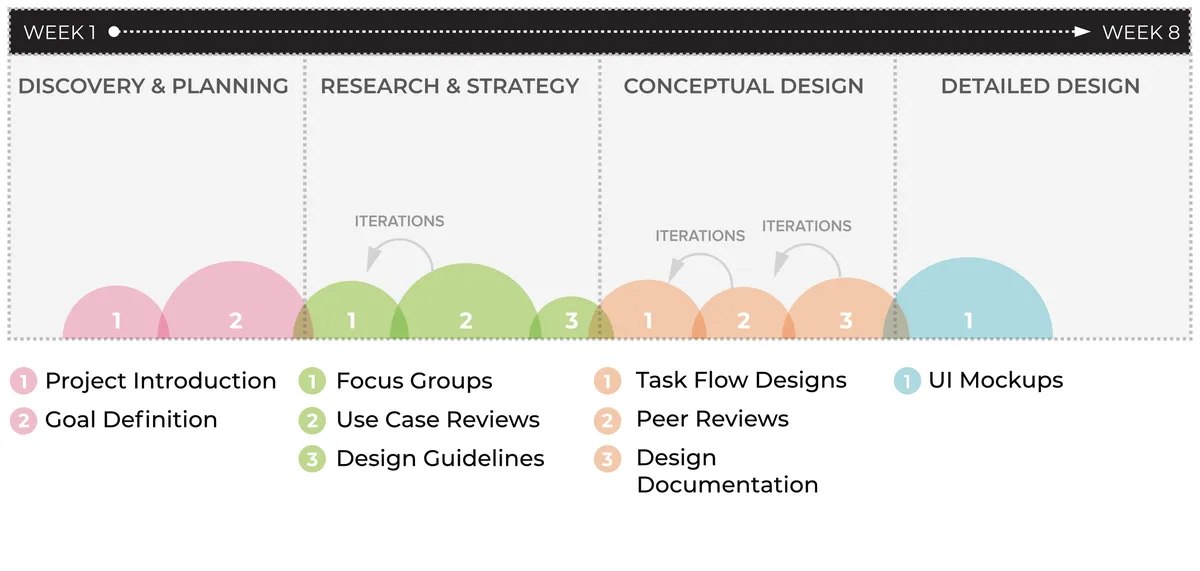
Engagement process: examining usability and task flows, refining the interface, and aligning the design with device and operational constraints.
1. Review usability and task flows
The work began by examining the existing application to identify interface issues and areas where task flows could better support business objectives. This helped frame the design problem in terms of both usability and the work users needed to complete.
2. Simplify information and navigation
The design focused on reducing screen clutter and making key information easier to distinguish. On a compact device, every element competes for limited space, so the interface needed to prioritise what users required at each step.
Navigation was also refined to reduce unnecessary interactions and make task progression more intuitive.
3. Design for the device and its users
The interface was designed around the capabilities of the Windows CE platform rather than assuming the resources or visual sophistication of a contemporary smartphone. Touch-based interaction and screen layouts needed to remain practical within those constraints.
The warehouse context also mattered. The design needed to account for the different roles using the application and support an experience that was straightforward to understand during operational work.
4. Align the interface with business objectives
The task flows and interface recommendations were considered in relation to the business functions the application supported. This connected usability improvements to the purpose of the tool, rather than treating visual refinement as an end in itself.
Deliverables and strategic significance
The engagement focused on improving the clarity and usability of the RFID-enabled handheld application.
Key outcomes of the design work included:
- A simplified interface: Reduced visual clutter to make the small-screen experience easier to navigate.
- More intuitive task flows: A focus on minimising unnecessary navigation steps.
- Context-sensitive interaction design: Touch-based screens shaped around the needs of warehouse employees, forklift operators, and engineers.
- Platform-aware design decisions: Interface choices aligned with the constraints of the Windows CE environment.
- Closer alignment with business tasks: Usability recommendations considered the operational objectives the application needed to support.
The broader lesson is that enterprise UX cannot be separated from the environment in which a system is used. A handheld device used in a warehouse has different requirements from a desktop application used in an office. Screen size, technical capability, user roles, and the sequence of operational tasks all influence what constitutes a usable interface.
This engagement demonstrates the importance of designing for the real conditions of use. By considering task flows, device limitations, and user context together, usability work can help make specialised enterprise tools more practical and accessible to the people who rely on them.
Explore other case studies →
AEROSPACE & TECHNOLOGY
AGRICULTURAL FINANCE
CONSUMER GOODS & MANUFACTURING
FINANCIAL SERVICES
PHARMACY & HEALTHCARE
RETAIL PHARMACY
TELECOMMUNICATIONS
TELECOMMUNICATIONS